
Accessibility has become personal for me. I am getting older, and large type is no longer an abstract preference somebody else needs. It is how I read a phone comfortably.
I worked with accessibility experts at Sun Microsystems and learned how deep the problem goes. A label is the easy part. Real accessibility needs roles, values, ranges, actions, traversal order, live announcements, collections, focus, platform conventions, and a way to test all of it. That complexity is why full Codename One accessibility support sat dormant for a decade.
We eventually added setAccessibilityText(). It was useful, but it was the poor man’s version. PR #5363 replaces that single-label model with a portable semantics tree we can be proud of.
Lightweight UI needs a second tree
Codename One paints lightweight components into its own native surface. VoiceOver cannot inspect a Button as a UIKit button because there is no UIKit button there. TalkBack cannot walk an Android View hierarchy because most of the painted controls are not Android views.
The new accessibility manager builds an immutable virtual tree beside the visual component tree. Standard controls infer their semantics. Custom controls can replace or extend them. Each port exposes that virtual tree through the platform accessibility API.
UIAccessibilityElement"] B --> D["TalkBack
AccessibilityNodeProvider"] B --> E["Windows
UI Automation"] B --> F["Linux
ATK / AT-SPI"] B --> G["Java SE
AccessibleContext"] B --> H["Web
off-screen ARIA DOM"]
The visual and semantic hierarchies can differ. A card made from five labels might need to read as one item. A chart may paint 200 points from one component, but expose each meaningful point as a virtual child. A renderer-backed list can expose stable rows even though those rows are not component instances.
Standard components work without annotations
Buttons, checkboxes, radio buttons, sliders, text fields, lists, tables, tabs, labels, dialogs, and containers infer their normal roles, values, states, and actions. Existing setAccessibilityText() calls continue to work as a compatibility alias for the semantic label.
You only add code when the inferred result is incomplete or the UI represents something more specific:
Button save = new Button("Save");
save.getSemantics()
        .setHint("Saves the edited profile")
        .setIdentifier("profile-save");
A custom switch can supply its role and checked state:
wifiSwitch.getSemantics()
        .setRole(AccessibilityRole.SWITCH)
        .setLabel("Wi-Fi")
        .setChecked(AccessibilityCheckedState.CHECKED)
        .setEnabled(Boolean.TRUE)
        .setHint("Double tap to turn Wi-Fi off");
Identifiers are for tooling and stable tests. Labels are for people. Keeping them separate avoids tests that break when product copy changes.
Semantics are more than labels
The API covers the parts a label-only layer cannot express:
AccessibilityRangedescribes minimum, maximum, current value, step size, and spoken value for sliders and progress controls.AccessibilityActionexposes standard activation plus named actions such as Archive or Delete.AccessibilityGroupingmerges descendants, treats a container as a group, or hides decorative subtrees.- Sort keys and traversal constraints change reading order without changing paint order.
- Collection metadata describes row and column counts, spans, position in a set, and selection behavior.
- Live regions announce status changes with polite or assertive priority.
- Virtual child providers expose semantic items that have no component instance.
Here is a chart exposing each data point as an accessible virtual child:
chart.getSemantics().setChildProvider(owner -> {
    List<AccessibilityNode> result = new ArrayList<>();
    for (ChartPoint point : points) {
        AccessibilityNode node = new AccessibilityNode(
                "point-" + point.getId());
        node.setRole(AccessibilityRole.IMAGE)
                .setLabel(point.getLabel())
                .setValue(point.getFormattedValue())
                .setBounds(point.getBounds());
        result.add(node);
    }
    return result;
});
That same tree can represent a list cell, a map marker, a game menu item, or any custom renderer where the meaningful objects do not map one-to-one to components.
Preferences can change the UI before a screen reader arrives
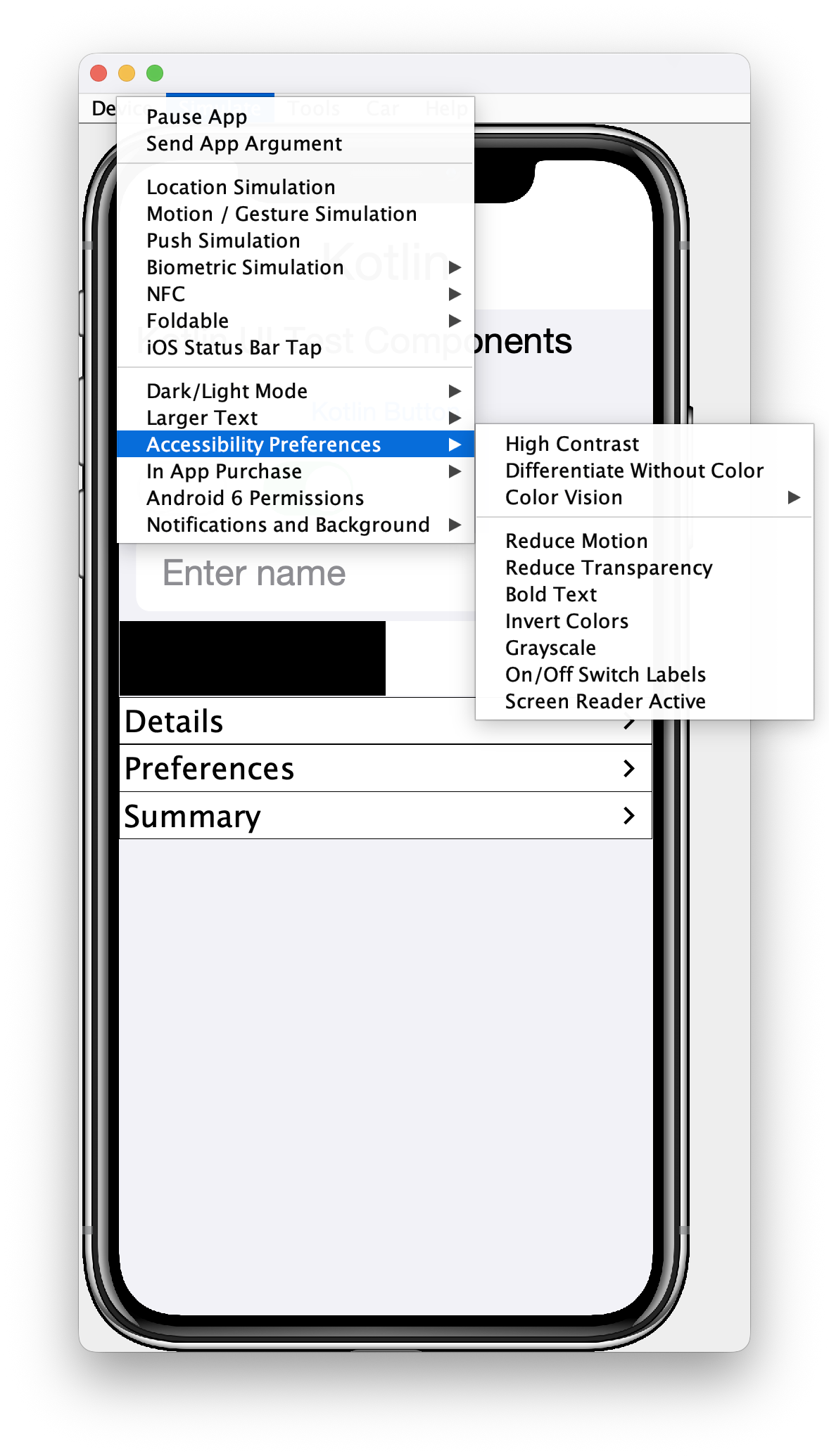
Accessibility includes users who never enable VoiceOver or TalkBack. The new APIs expose high contrast, reduce motion, reduce transparency, differentiate without color, and known color-vision deficiency preferences.
if (CN.isHighContrastEnabled()) {
    chart.setUIID("HighContrastChart");
}
if (CN.isReduceMotionEnabled()) {
    chart.putClientProperty("animate", Boolean.FALSE);
}
if (CN.isReduceTransparencyEnabled()) {
    chart.setUIID("OpaqueChart");
}
AccessibilityColorVisionDeficiency colorVision =
        CN.getColorVisionDeficiency();
if (CN.isDifferentiateWithoutColorEnabled()
        || (colorVision != AccessibilityColorVisionDeficiency.NONE
        && colorVision != AccessibilityColorVisionDeficiency.UNKNOWN)) {
    status.setText("Disconnected: action required");
}
Color must never be the only signal for important state. The preference is an extra input, not permission to hide the text or icon when the preference is absent.
The simulator now lets you force these states, including combinations that are awkward to reproduce on a physical device.
The inspector audits the resolved tree
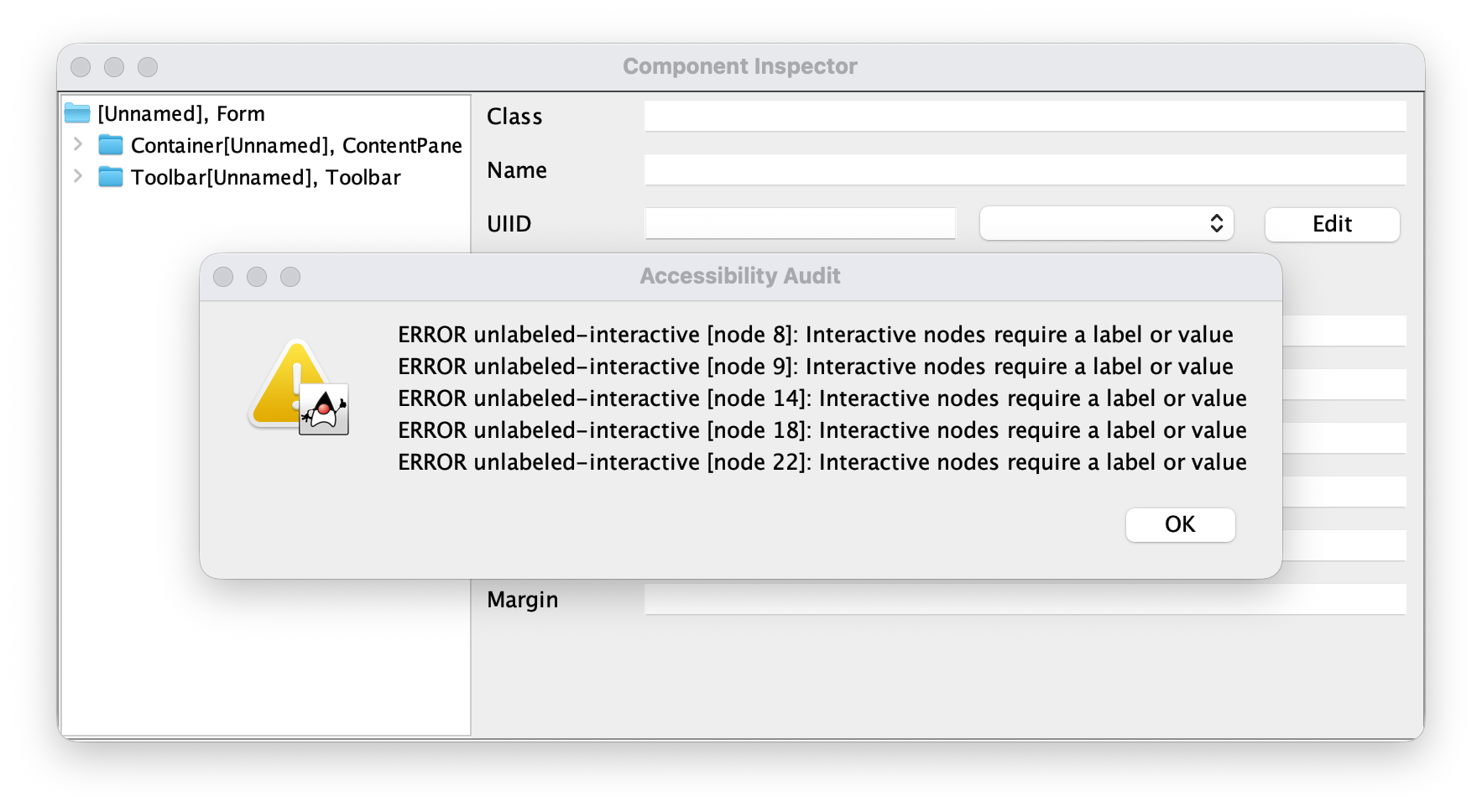
The Component Inspector has an Accessibility tab that shows the tree the platform will receive. It flags unlabeled interactive nodes, duplicate identifiers, invalid ranges, contradictory state, traversal cycles, and other machine-detectable failures.
You can put the same checks in a unit or screenshot test:
AccessibilityTreeSnapshot tree =
        AccessibilityInspector.snapshot(form);

AccessibilityAssertions.assertNoErrors(tree);
AccessibilityAssertions.assertNoUnlabeledInteractiveNodes(tree);

AccessibilityNodeSnapshot save =
        tree.getNodeByIdentifier("profile-save");
if (save.getRole() != AccessibilityRole.BUTTON) {
    throw new AssertionError("profile-save must expose the button role");
}
if (save.getAction(AccessibilityAction.ACTIVATE) == null) {
    throw new AssertionError("profile-save must expose the activate action");
}
The snapshot is immutable and can be serialized as JSON. That makes failures reviewable in CI and gives a bug report something more precise than “VoiceOver skipped my button.”
Every platform still gets a human pass
An automated audit can prove that an interactive node has a label. It cannot prove that VoiceOver speaks the right sentence, that TalkBack focus recovers after a dialog closes, or that a Windows screen-reader user understands a custom collection.
The final check still uses VoiceOver, TalkBack, Narrator, Orca, Java Access Bridge, or browser accessibility tools. Navigate in both directions. Activate every action. Change adjustable values. Enter and leave collections. Trigger errors and live updates. Confirm focus after navigation, deletion, and modal dialogs.
That is the boundary. The portable semantics tree removes the architectural wall and makes most behavior testable once. Platform assistive technologies still apply their own presentation rules.
The surprise is that this tree also describes the screen to software. Tomorrow’s post shows how the same immutable snapshot lets an AI agent inspect and drive the simulator over the Model Context Protocol without relying on screenshot coordinates.
Discussion
Join the conversation via GitHub Discussions.